Tutorial
Which genes do the variants fall in?
Overlap filtered variants with gene coordinates using bedtools, and see why one variant can land in two genes. All in your browser.
What you will learn
- Combine two inputs in one workflow
- Overlap variants with gene coordinates using bedtools intersect
- Read overlap output, including variants in overlapping genes
- Count variants per gene
The data
sample1.vcf, the 12 variants from the explore variants tutorial, and phix-genes.bed, the 11 genes of PhiX174 as annotated by NCBI (NC_001422.1). Genes A, A* and B cross the end of the circular genome, so each takes two lines.
Tools in this tutorial
Watch it first
The whole tutorial in under 2 minutes, recorded in the live app. The run is sped up.
Steps
- 01
Load the files
Open the Workflow Builder at biochef.app. In File manager, upload
sample1.vcfandphix-genes.bed, and ticksample1.vcffor the Input node. New to the editor? The map reads tutorial shows each move with screenshots. - 02
Keep the reliable variants
Add Filter (BCFtools), switch on include and type
QUAL>=30 && INFO/DP>=10, the same filter as in the explore variants tutorial. - 03
Overlap the variants with the genes
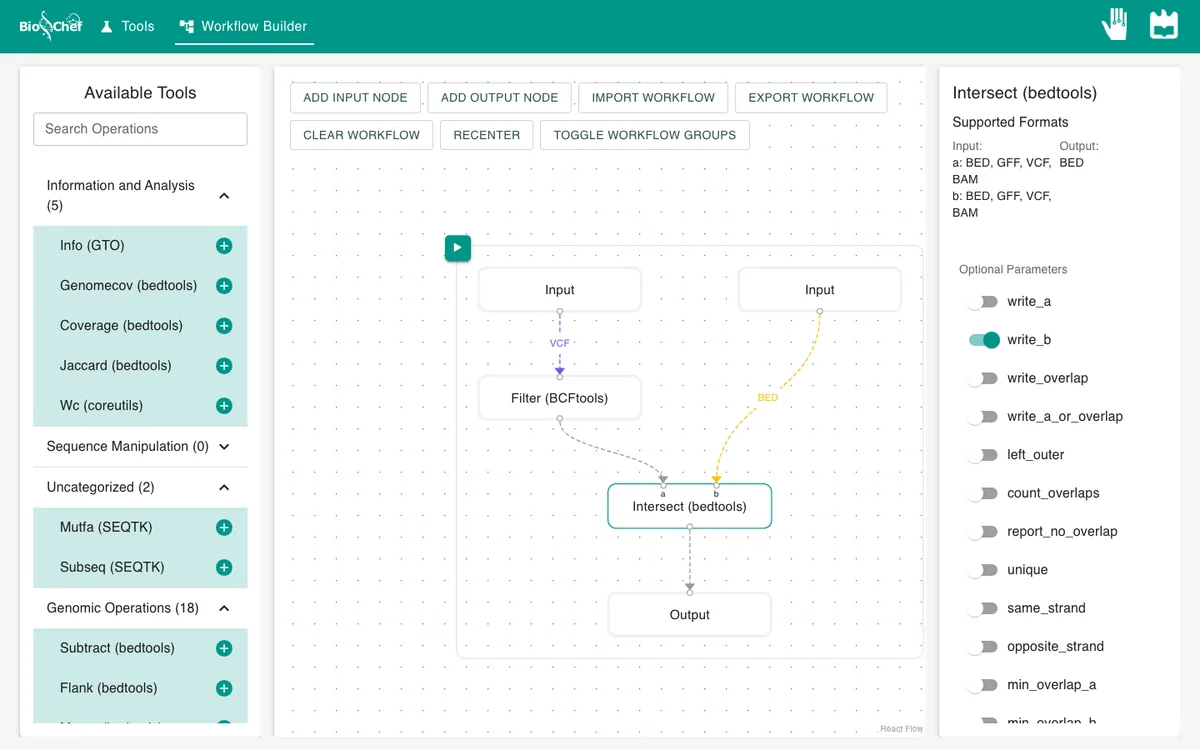
With the Filter node selected, add Intersect (bedtools) and connect the filter to its a dot. Add a second Input node with
phix-genes.bedand connect it to b. bedtools reports every place where something in a overlaps something in b. - 04
Ask which gene each variant hits
Click the Intersect node and switch on write_b, so each line shows the variant followed by the gene it falls in. Add an Output and press ▶.
- 05
Read the result
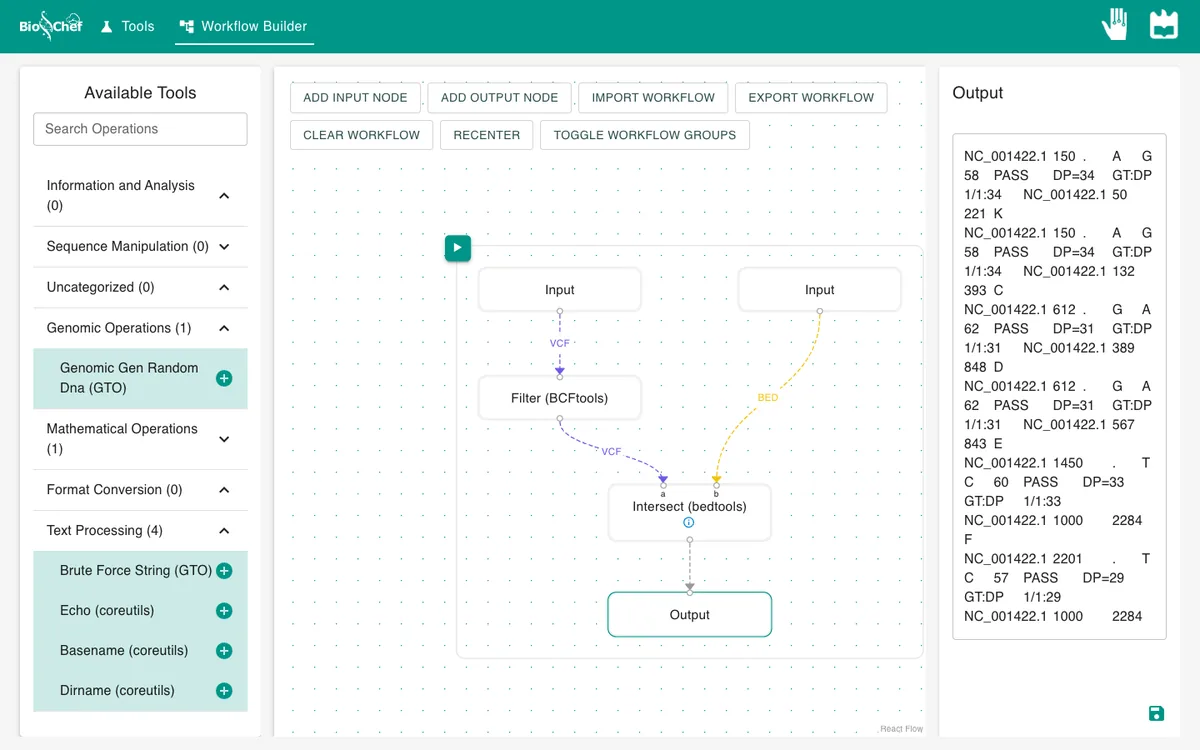
Each line is a variant from the VCF, then the gene from the BED file: chromosome, start, end and gene name.
What you should see
variant  gene
150      K
150      C
612      D
612      E
1450     F
2201     F
3077     H
3400     H
3999     A
4810     A
4810     A*
Shortened here to the variant position and gene name. The 8 variants give 11 lines because three of them sit in two genes at once: PhiX174 packs genes inside other genes, read in different frames. Position 150 is in both K and C, 612 in D and E, and 4810 in A and A*.
Use the finished workflow
Import the finished workflow, data included, and press ▶. Remember that an exported workflow contains the data loaded in its Input nodes.
Exercise: how many variants does each gene have?
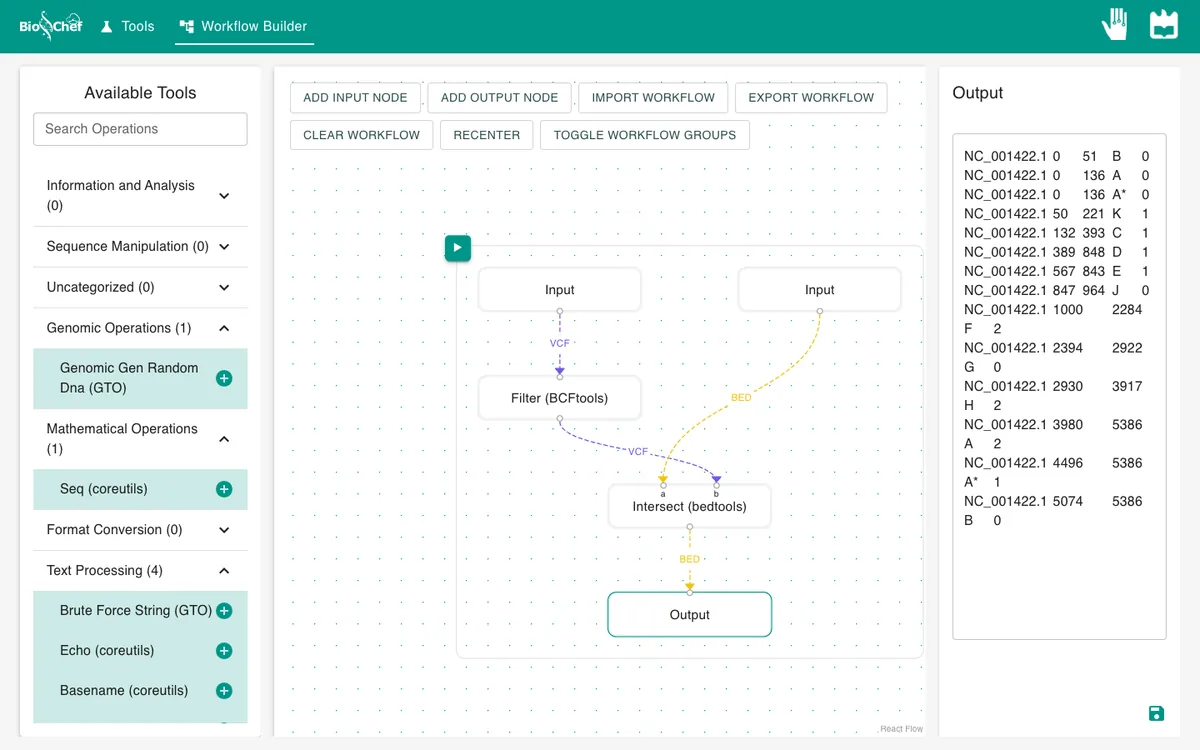
Swap the inputs of Intersect: genes into a, filtered variants into b. Switch write_b off and count_overlaps on, then run. Each gene line now ends with its number of variants: F, H and A have 2; K, C, D, E and A* have 1; B, J and G have 0.
From a test to a full run
The browser is the place to build and test a workflow on small data like this. For full datasets, the same workflow file is meant to run next to the data with the BioChef agent, which is in development. See Workflows for how the two fit together.
More tutorials: all BioChef tutorials.
This tutorial is licensed under CC BY 4.0. If you use BioChef in your work, please cite Rosa et al., BMC Bioinformatics 2026. BioChef is listed in bio.tools as biotools:biochef.