Tutorial
First steps with DNA sequences
Count bases, cut a gene out of a genome and read it from the other strand with seqtk. A gentle start for a class or for anyone new to sequence files. All in your browser.
What you will learn
- Read a FASTA file and count its bases
- Use a BED file to cut a region out of a genome
- Reverse-complement a sequence
- Recognise start and stop codons
The data
The genome of bacteriophage PhiX174 (NC_001422.1, 5,386 bp) and gene-G.bed, the position of gene G, which codes for the virus’s major spike protein.
Tools in this tutorial
- seqtk
- A small toolkit for FASTA and FASTQ files: counts reads and bases, reports base composition, extracts regions and reverse-complements sequences.
Watch it first
The whole tutorial in under 3 minutes, recorded in the live app. The run is sped up.
Steps
- 01
Load the genome and the region
Open the Workflow Builder at biochef.app. In File manager, upload
phix174.fastaandgene-G.bed, and tickphix174.fastafor the Input node. New to the editor? The map reads tutorial shows each move with screenshots. - 02
Count the bases
Search
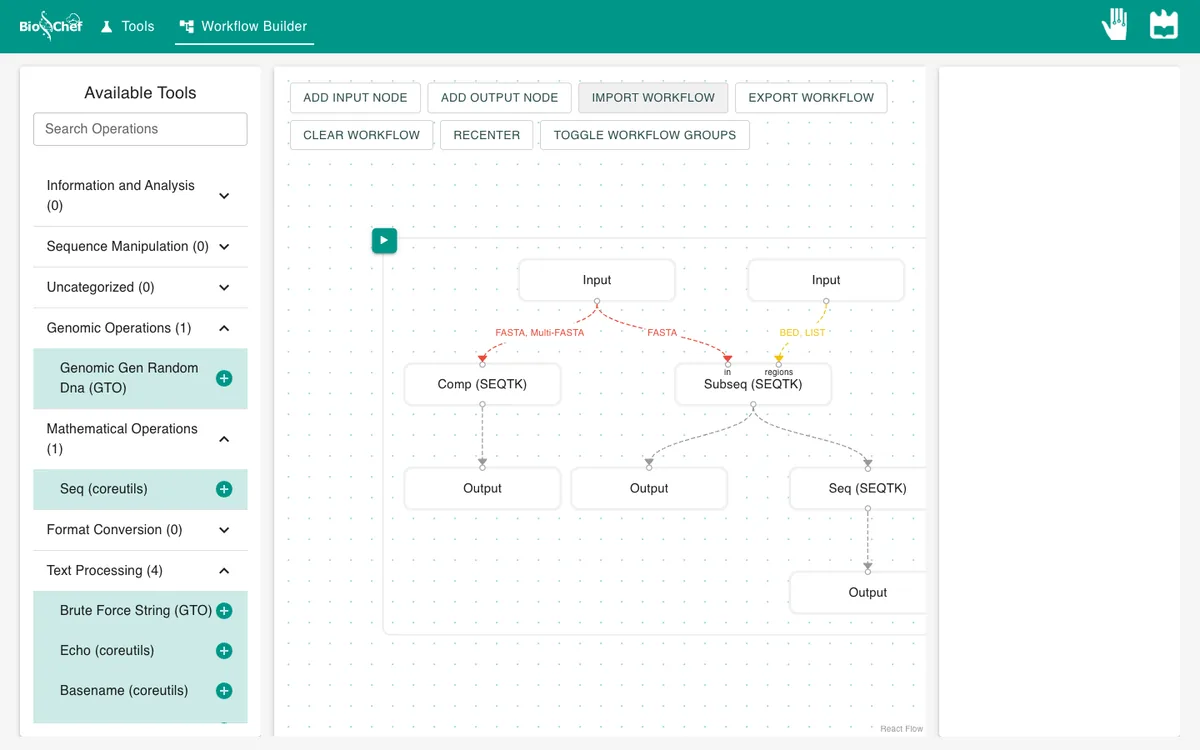
compand add Comp (SEQTK); connect the genome to it and add an Output. seqtk comp reports, for each sequence, its length and how many A, C, G and T it has. - 03
Cut out one gene
Select the genome Input and add Subseq (SEQTK): genome into in, a second Input with
gene-G.bedinto regions. The BED file holds one line: the sequence name, a start and an end. BED counts from 0, so2394 2922means positions 2395 to 2922. Add an Output. - 04
Read the other strand
Select Subseq and add Seq (SEQTK). Switch on reverse_complement: DNA has two strands, and this writes the gene as read from the opposite one. Add an Output and press ▶.
- 05
Look at the gene
Click the Subseq Output. The sequence starts with
ATG, the start codon, and ends withTGA, a stop codon: this stretch of DNA codes for a protein, the major spike protein G.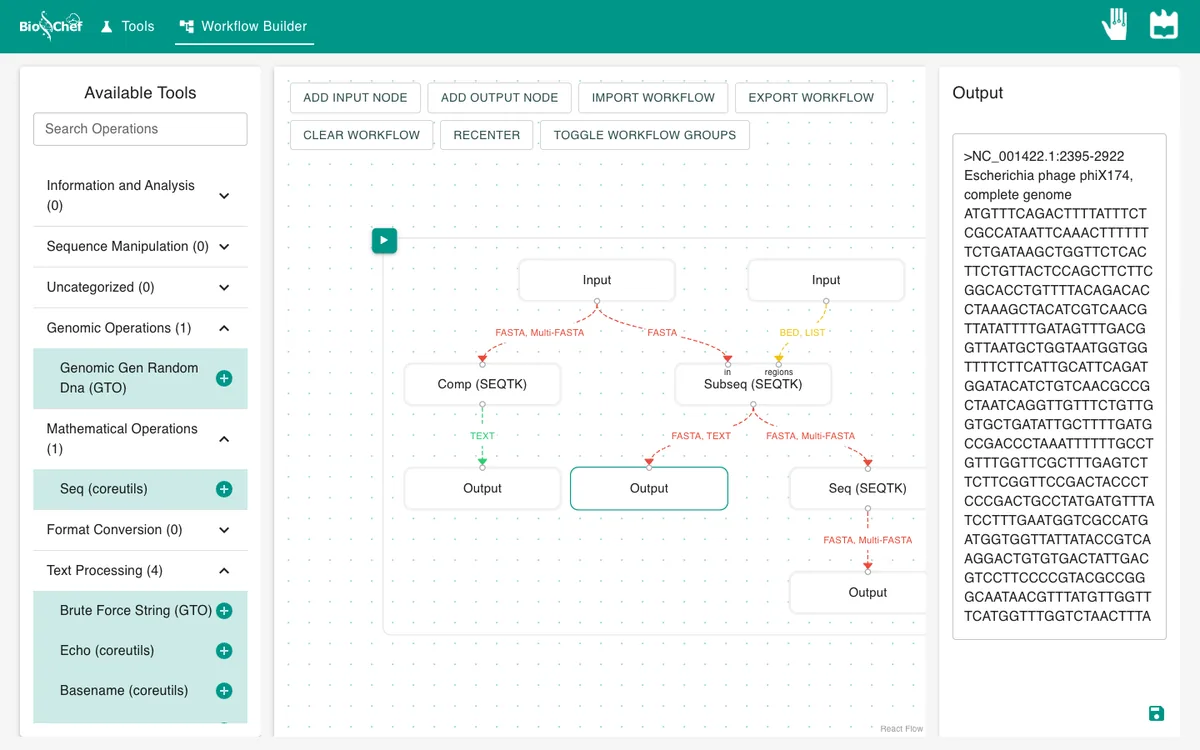
What you should see
name          length  A     C     G     T
NC_001422.1   5386    1291  1157  1254  1684

>NC_001422.1:2395-2922   528 bp, starts ATGTTTCAGACT…, ends …CTTAAGTGA
reverse complement       starts TCACTTAAGTGG…
Shortened here; seqtk comp prints more columns (ambiguous bases and CpG counts, among others). The genome is 44.76% G+C. Gene G is 528 bp: 176 codons, the last one a stop. Its reverse complement starts with TCA, the reverse complement of the stop codon TGA.
Use the finished workflow
Import the finished workflow, data included, and press ▶. Remember that an exported workflow contains the data loaded in its Input nodes.
Exercise: is the gene richer in G+C than the genome?
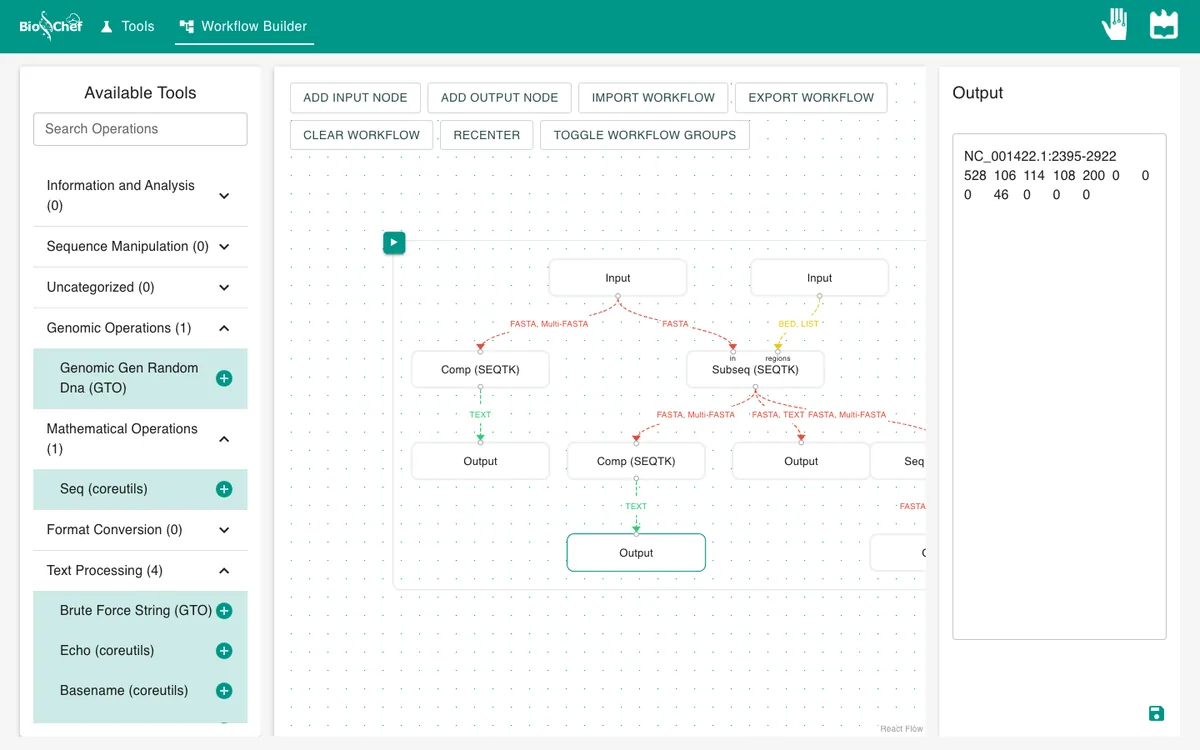
Add a second Comp (SEQTK) after Subseq, with its own Output, and run again. Gene G has A=106, C=114, G=108, T=200: 42.05% G+C, a little lower than the genome’s 44.76%.
From a test to a full run
The browser is the place to build and test a workflow on small data like this. For full datasets, the same workflow file is meant to run next to the data with the BioChef agent, which is in development. See Workflows for how the two fit together.
More tutorials: all BioChef tutorials.
This tutorial is licensed under CC BY 4.0. If you use BioChef in your work, please cite Rosa et al., BMC Bioinformatics 2026. BioChef is listed in bio.tools as biotools:biochef.