Tutorial
Compare two related genomes
Align the genomes of two related phages with minimap2, measure how similar they are, and discover why a circular genome can align in two pieces. All in your browser.
What you will learn
- Align a whole genome against another with minimap2
- Read identity and differences from PAF output
- Understand why circular genomes can align in pieces
- See how the choice of reference changes the coordinates
The data
Two real genomes from NCBI: bacteriophage PhiX174 (NC_001422.1) and its close relative S13 (NC_001424.1), both 5,386 bp.
Tools in this tutorial
- minimap2
- Aligns DNA sequences, from short reads to whole genomes, against a reference. It writes SAM for downstream tools or PAF, a plain table of where each sequence matches.
Watch it first
The whole tutorial in under 2 minutes, recorded in the live app. The run is sped up.
Steps
- 01
Load the two genomes
Open the Workflow Builder at biochef.app. In File manager, upload
phix174.fastaands13.fasta, and ticks13.fastafor the Input node. New to the editor? The map reads tutorial shows each move with screenshots. - 02
Align one genome to the other
Add Align (minimap2): S13 into reads, a second Input with
phix174.fastainto ref. PhiX174 is the reference: positions are reported on its coordinates. - 03
Use the genome-to-genome settings
Click the minimap2 node. Switch on preset and type
asm5, the setting for aligning one assembly to another when they differ by well under 5%, as these two do. Switch on output_cigar so each line also counts the differences (NM). Leave sam_output off to get PAF, a table.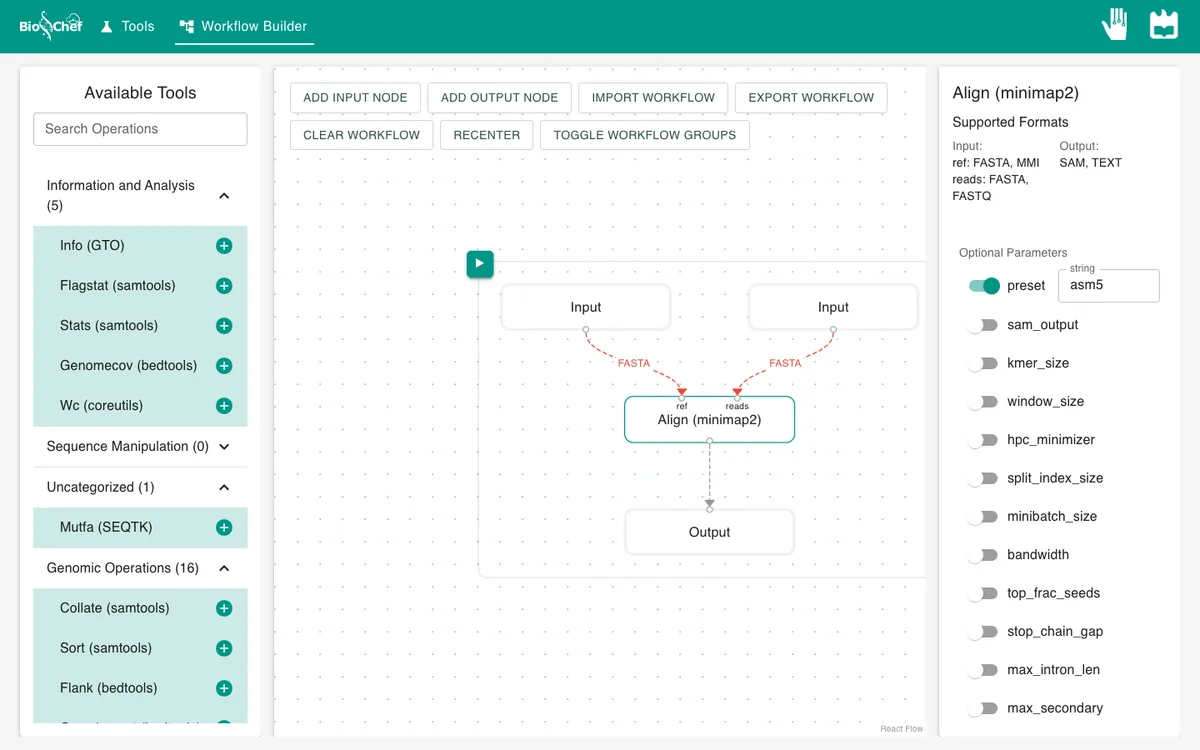
- 04
Run and read the PAF table
Add an Output and press ▶. Each line is one aligned block: query name, length, start and end; strand; reference name, length, start and end; matching bases; block length; mapping quality; then tags such as
NM.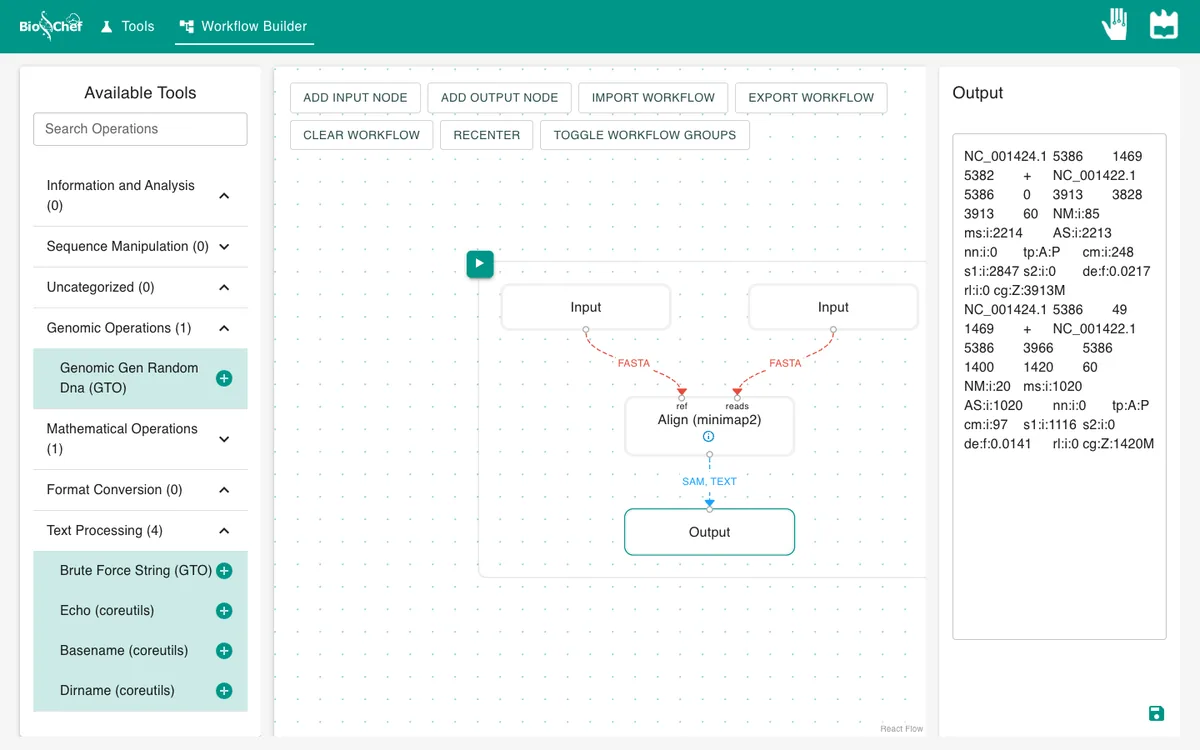
What you should see
NC_001424.1 5386 1469 5382 + NC_001422.1 5386    0 3913 3828 3913 60 NM:i:85
NC_001424.1 5386   49 1469 + NC_001422.1 5386 3966 5386 1400 1420 60 NM:i:20
Two blocks, not one. Both genomes are circles, but each was written down from a different starting point. S13 from 1470 onwards matches the start of PhiX174, and S13’s first part matches PhiX174’s end. Together: 5,228 identical bases out of 5,333 aligned (about 98%), with 105 differences. PAF counts positions from 0.
Use the finished workflow
Import the finished workflow, data included, and press ▶. Remember that an exported workflow contains the data loaded in its Input nodes.
Exercise: swap the reference
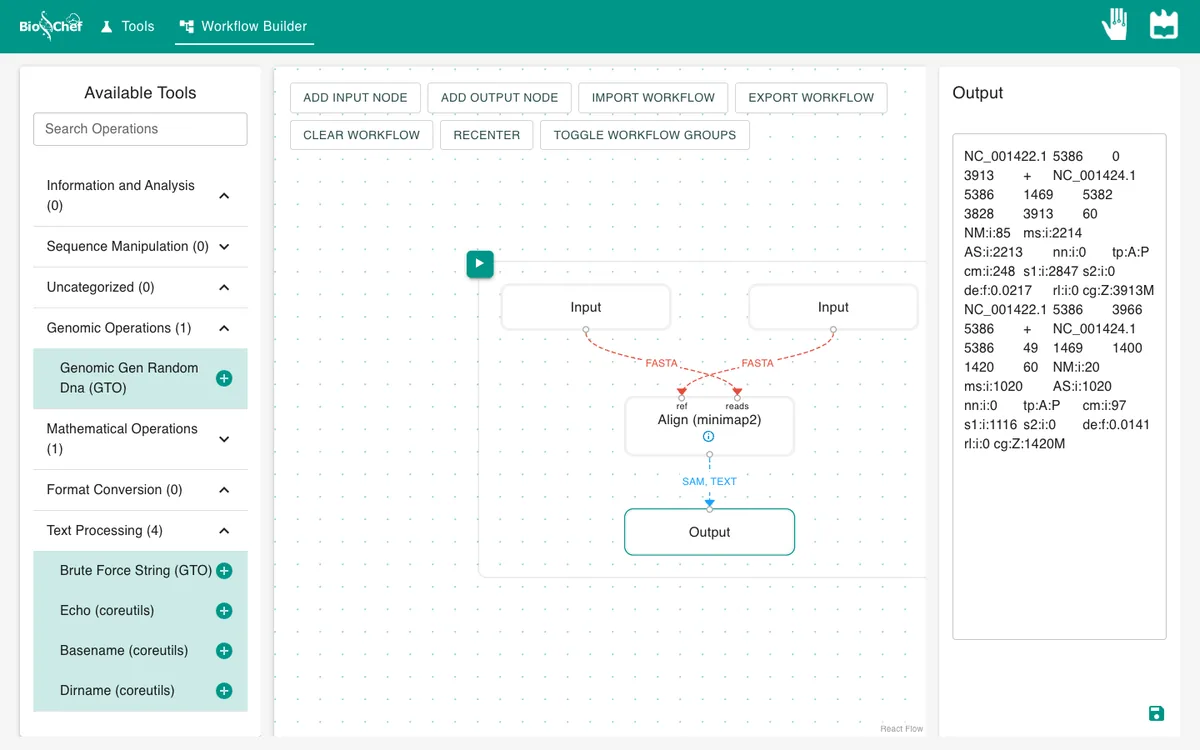
Swap the connections so that PhiX174 goes into reads and S13 into ref, and run again. You get the same two blocks and the same numbers, with the coordinates on the other side: PhiX174 0–3913 now lands on S13 1469–5382. The choice of reference decides whose positions you read.
From a test to a full run
The browser is the place to build and test a workflow on small data like this. For full datasets, the same workflow file is meant to run next to the data with the BioChef agent, which is in development. See Workflows for how the two fit together.
More tutorials: all BioChef tutorials.
This tutorial is licensed under CC BY 4.0. If you use BioChef in your work, please cite Rosa et al., BMC Bioinformatics 2026. BioChef is listed in bio.tools as biotools:biochef.